OCPL Catalog Software Upgrade

Our OCPL system is installing an upgrade to the library catalog software starting on Sunday, November 2 at 6 PM. While this will provide enhanced services for patrons and staff, it will make the system unavailable during the upgrade process which might extend into Monday morning, November 3. This means the online catalog will be down, and any service that requires authenticating with a library card, such as Libby, Hoopla, and the databases, will be unavailable.

We hope that everything will be up and running again by the start of business on Monday, but please bear with our OCPL technicians as they undertake this huge job. We appreciate your patience. Of course, any items you have already checked out or downloaded will be accessible, so make sure to have your reading material on hand before Sunday afternoon.

Hoopla problems resolved!

Hoopla says that they have resolved the tech issues they were having.

I (Pete) tested things out and was able to use the app, but please let me know if you’re having any problems with it.

Hoopla problems

Hoopla has sent us the following message:

Due to the ongoing Amazon Web Services issue that is currently affecting internet access across the globe, Hoopla Digital is experiencing technical issues. The team is monitoring the situation and working to get the platform fully functional as soon as possible. Thank you for your patience!

On the Shelf is Back!

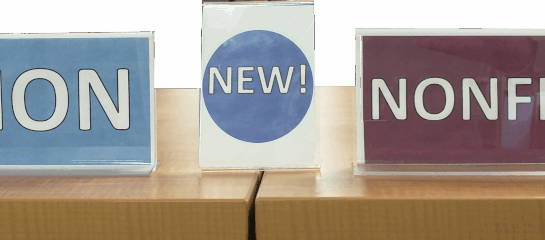
Signs for Maxwell's New Books section reading (respectively) Fiction, New!, and Nonfiction.

Back in December, when Maxwell changed platforms for our events calendar, we lost the service that kept our On the Shelf webpage up-to-date with our new books, movies and audiobooks. We’re happy to say that we signed up for Wowbrary, a service that lets us resume On the Shelf. Additionally, those who are interested can sign up to get a weekly alert showing the newest books, DVDs, and audiobooks that we add to our collection.

The nice thing about Wowbrary is that titles are connected to our library catalog. Whenever you spot something of interest, you’ll be able to click instantly, reserve it, and check it out at your convenience. And of course, like everything else in the library, this service is free!

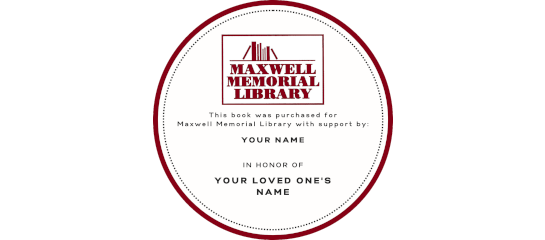
Dedicate a Maxwell Memorial Library Bookplate

We are offering the perfect gift to honor your loved ones: With a donation of just $35, a bookplate inscribed with your honoree’s name will be placed inside a book in Maxwell Memorial Library’s collection. You may choose to select whether the bookplates are “in honor” or “in memory of” a loved one, or simply “presented by” an individual or family.

All donations to the library are tax-deductible.

Here’s how it works:

  • Choose the friend or family member you’d like to honor
  • Choose the book category
    • Children’s Book
    • Young Adult Book
    • Adult Book
    • No Preference
  • List a preferred category or genre (Examples: Fiction – Romance; Non-Fiction – Gardening)
  • Make a tax-deductible gift of at least $35

Please note that we are unable to accommodate requests for specific titles or narrow genre requests.

Ordering

Order Online

You can order online here.

Payments accepted through Maxwell’s PayPal link.

Order By Mail

Fill out and print a bookplate form.

Mail your completed form with a check payable to Maxwell Memorial Library:

Maxwell Memorial Library
14 Genesee Street
Camillus, NY 13031

Order In Person

Visit the library to fill out a bookplate form. We accept payment by cash or check.

If you have any questions, please call the library at (315) 672‑3661.

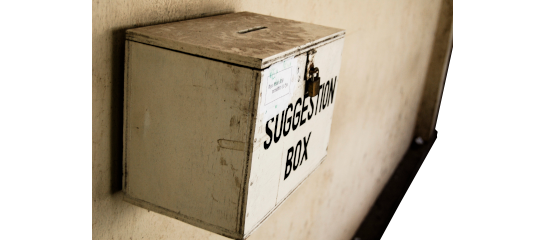
Make a suggestion

We now have a form for suggesting material for us to add to the collection. The title of the form is Maxwell Book Suggestion Form, but don’t let the word “book” in the title limit you. You can use the form to suggest any type of material: books, movies, TV series, games, …


Image credits:
Derived from Suggestion box
Original by Hash Milhan
License: CC BY 2.0

Brainfuse

OCPL has added Brainfuse to its databases.

Brainfuse is a resource for helping kids and adults with studying, test preparation, and the like. The descrition from OCPL’s Database Page appears below.

You can login to Brainfuse at this link.


Online test preparation, homework help, study aids, skill building, and live tutoring resource for children and adults.  

Live Tutors are Available from 2:00 PM to 11:00 PM daily.

  • Live Tutoring offers live tutor access for homework help, skills building and test preparation.  Because HelpNow is personalized, both the student and the tutor can access quiz questions to do an intensive test prep which may include loading lessons on the whiteboard. All live sessions are saved and can be replayed as well as shared with friends and teachers by email.  Using the CloudPack feature, students can store and upload MS Word, Excel, JPG, and other accepted file types directly onto the whiteboard.
  • The Writing Lab and the 24/7 Center features give patrons the freedom to receive assistance at any time of the day without connecting with a live tutor.  Users can submit papers through the Writing Lab for detailed feedback.  24/7 Center is for non-writing assignments such as math or science. 
  • MEET allows students to schedule their own online sessions using the Brainfuse MEET whiteboard which is specifically designed for a group setting.  Brainwave is a recordable whiteboard where students can draw, write on the whiteboard and chat then save and email it to others for feedback.
  • Adult Learning Center is the adult learners’ version of HelpNow™ where patrons can access High School Equivalency prep, US Citizenship test prep, resume assistance, Microsoft Office support, and Career Resources. The Writing Lab, Send Question, and Skills Building are also included in the Adult Learning Center suite. 

I-81 Viaduct Project Draft Environmental Impact Statement

Maxwell is a repository for the I-81 Viaduct Project Draft Environmental Impact Statements.

The Final Design Report/Final Environmental Impact Statement/Final Section 4(f) Evaluation is now available for review in the library.

The report’s 30-day public review period goes through Monday, May 16.

New York Times

Library patrons of Onondaga County Public Library System libraries now have access to The New York Times:

NOVELny and Gale are providing access to the New York Times in their redesigned New York Times Database.

  • The U.S. Edition:
    Full text coverage from 1/1/1985 to the current day. The paper is published 7 days a week.
  • The International Edition:
    Full text coverage from 11/2/2013 to the current day. The paper is published 6 days a week.

The next time you can’t read a New York Times article on the Web because you don’t have a subscription, check out the Gale New York Times Database, available to all OCPL patrons and to all N.Y. State residents.

New York Heritage website

Default Thumbnail

New York Heritage shared this with us:

New York Heritage has launched a redesigned website! This upgrade has a few notable features:

  • Smoother navigation with faster page loads
  • Browse collections by Topics and Type from the main page
  • Organizations’ landing pages now have location maps
  • Collection landing pages have image captions and links to similar collections
  • Backend improvements that make it easier to edit and maintain

Let us know what you think of the new design by filling out the User Experience Survey.


One of New York Heritage’s collections is digitized versions of West Genesee yearbooks. Check them out!

Database survey

Do you use any of the databases that Onondaga County Public Libraries makes available to all patrons? OCPL will be conducting a survey about the databases from September 13 through September 30 and would like to get feedback from all who use them.


Image credits:
Database icon by Zahra Ibrahem
License: CC BY-SA 4.0

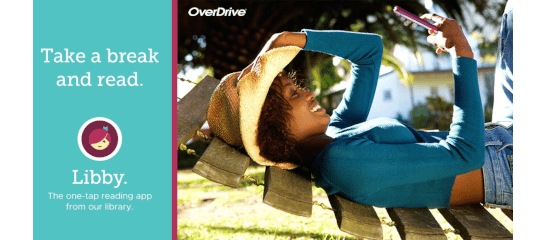
OverDrive Encourages Patrons to Move to Libby

OverDrive has begun phasing the old OverDrive app out. If you already use the Libby app, you don’t need to do anything , but OverDrive would like to get people using the old app to switch over to Libby by the end of 2022.

Alternatively, you will continue be able to borrow and read items using a generic web browser (for instance, Chrome, Edge, Firefox, Opera, and so on).

Lynda.com has become LinkedIn Learning

LinkedIn acquired Lynda.com, so patrons who were using the Lynda.com app will need to download the free LinkedIn Learning app and set it up. Here are the instructions:

  1. Before using the app, set up your account online using a web browser (you’ll need your library card’s barcode and PIN)
  2. Download the free LinkedIn Learning app onto your mobile device from the appropriate place (The App Store for iOS/Google Play for Android)
  3. When you open the app, choose Sign In, even if you have never used Lynda.com or LinkedIn Learning
  4. Leave the email box blank and click on blue text Sign in with your library card
  5. The app will take you to a page that asks for your library’s ID. Enter onondagacounty in the text box at the end of the address.
  6. You’ll then be asked for your email address, library card barcode number, and PIN

LinkedIn Learning is an extensive collection of award-winning online courses and video tutorials to help you learn business, technical and creative skills. Achieve your personal and professional goals. Courses are taught by recognized industry experts. Learn what you want, when you want, from our entire library. Build custom playlists to organize courses you want to watch.  Watch courses on your computer, tablet, or mobile device. Switch back and forth without ever losing your place.

The Post-Standard Online

Default Thumbnail

Post-Standard

Log on with your library card’s barcode number and your PIN.

Ancestry Library Edition

During the time we (and all of OCPL) were closed, ProQuest had made it possible for patrons to access the Ancestry Library database from home (normally it’s only available when connecting from a library). They have now told us that free remote access to Ancestry Library will be continuing for all public library cardholders at least through July 2020.

To access the database, go to OCPL’s database page and scroll down the alphabetical list to Ancestry Library.

Hoopla Extends Bonus Borrows Through May 31

From Hoopla’s May 8 blog post:

Due to the overwhelmingly positive response and the continued need of our library partners and their communities, we have extended the availability of the hoopla Bonus Borrows collection through May 31! We have changed some of the titles and increased the overall size of the collection to help patrons have even more choices. hoopla’s Bonus Borrows collection now includes more than 1,500 titles—including Harry Potter and the Sorcerer’s Stone in both audiobook and eBook!

As a reminder, each circulation of a Bonus Borrows title is complimentary to libraries, and does not count against a patron’s monthly borrow limit.

From the Internet Archive:

Default Thumbnail

Announcing the National Emergency Library, a collection of books that supports emergency remote teaching, research activities, independent scholarship, and intellectual stimulation while universities, schools, training centers, and libraries are closed.

Cut to the Chase: Direct Links to eBooks

Default Thumbnail

Overdrive/Libby and Hoopla will continue to be available for borrowing items during this time. Additionally, OCPL has other eBook collections available for the next few months. To see what’s available go to https://www.onlib.org/find/e-books-and-more and scroll down.

OCPL’s E-Books and More page

Default Thumbnail

This collection is, of course, where to find links to Overdrive/Libby and Hoopla — our long-term providers of eBooks, eMagazines, and eMedia. It also has links to the other services we subscribe to and to some that we have temporary access to like Tumble Book Library or Audible.com’s selections for K–12 students.

Learning & Test Preparation

Default Thumbnail

OCPL has added a database of resources for test preparation, college and career planning, and related needs. It is the Gale Testing & Education Reference Center (TERC), and it replaces Learning Express. You can get to it through one of the links above or by going through OCPL’s Database page (scroll down to “T” for testing).

The Post-Standard

Default Thumbnail

OCPL’s Newsbank database provides library patrons access to the Syracuse Post-Standard and to blogs hosted at Syracuse.com. You can follow this link to get access. You may need to enter your library card’s barcode number and your PIN to log on.

Mango Languages

Default Thumbnail

Mango Languages is an interactive system for learning a language. You can get more information at OCPL’s Databases page (Click on Education and Careers to narrow the list), or you can go straight to the login page (you’ll need your library card’s number and PIN).

OCPL’s Databases page

Default Thumbnail

Start here for answering questions on topics ranging from Antiques or Business to Religion or Technology. Some of the databases here that you would normally need to be in the library to access are temporarily available to patrons from home.